
AT&T Visual Voicemail
AT&T Services, Inc.Communication
3.17.58K Reviews
- Version
- 4.24.0.10251
- Installs
- 10.00M
- Age Rating
- Everyone
Screenshots
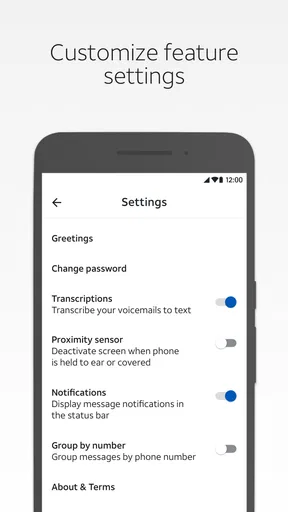
Our Review of AT&T Visual Voicemail
 Analysis by Appyee
When voicemail is part of your everyday communication, the difference between hearing messages one by one and seeing them arranged on a screen is surprisingly important. I spent time with AT&T Visual Voicemail to see whether it makes missed calls easier to manage or simply adds another layer between me and the phone network. My overall impression is that it is a focused tool rather than a full communication platform: its job is to help AT&T customers handle voicemail messages more conveniently.
The app sits in the communication category and is developed by AT&T Services, Inc. It is free to use, rated for Everyone, and supports devices running Android 10 or later. Its current version is 4.21.0.10247. Those details matter because this is not a universal voicemail replacement for every carrier; its usefulness depends heavily on having the right AT&T service and a compatible phone. If that describes you, the app can be a practical improvement over calling a voicemail number and navigating spoken menus.
How the app feels when connectivity is doing the work
The central experience is built around network communication. A visual voicemail app needs to retrieve voicemail information from the carrier, display messages, and keep the phone’s view aligned with what is available through the voicemail service. That makes connectivity part of the product itself, not merely a background convenience. When the phone has a reliable mobile connection, the app’s main advantage is clear: I can approach voicemail as an inbox instead of a phone call.
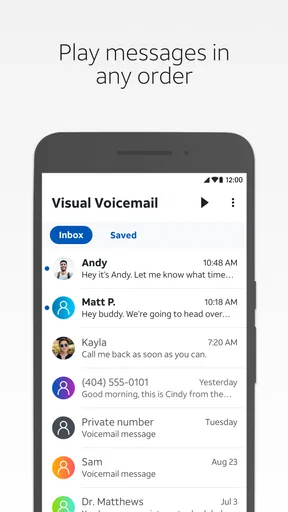
That change affects how I decide which messages deserve attention. With a traditional voicemail system, I usually have to listen in sequence, remember who called, and wait through prompts before moving on. A visual interface makes it easier to choose a message based on the caller or the order in which it arrived. For someone who receives appointment calls, delivery updates, school messages, or work-related calls, that small amount of control can save time.
The network dependency also creates a useful mental model: the app is a window into a carrier service, not an independent audio archive. If a message is slow to appear or the interface does not immediately reflect an action, I would first think about the connection and the carrier service before assuming the app itself is broken. This is one of the most important practical distinctions between a voicemail client and a self-contained notes or media app.
In a strong-signal situation, the workflow is straightforward. I open the app, look over the available voicemail entries, choose the message that seems relevant, and deal with it without having to listen to unrelated messages first. That selective approach is especially helpful when I am in a hurry. It also reduces the chance of missing an important detail simply because I stopped listening before reaching the right message in a long queue.
There is a trade-off, though. The more I expect the app to behave like a normal inbox, the more noticeable it becomes when the carrier connection is delayed. A messaging app may feel nearly instantaneous because it is designed around constant synchronization, while visual voicemail can feel more dependent on the underlying phone service. I would not judge it by the same standard as a chat app. Its job is narrower, and its responsiveness is tied to the voicemail system behind it.
What changes in real mobile situations
The strongest use case is not sitting at home and casually checking messages. It is being away from a desk when a missed call matters. Imagine leaving a medical office, seeing that an unfamiliar number called, and needing to decide whether to call back immediately. A visual list lets me identify the relevant voicemail without working through every earlier message. If the network is behaving normally, that is a much calmer experience than dialing in while walking through a parking lot.
The same applies to commuting, shopping, or moving between appointments. I can check the message that relates to the current task instead of treating voicemail as a single block of audio. This is particularly useful for people who receive a mixture of personal calls and automated notifications. The ability to focus on one message at a time makes the phone feel less demanding.
However, mobile use also exposes the app’s limits. A weak signal, a congested location, or a transition between network conditions can interrupt the experience. I would avoid making an important decision based solely on an entry that has not fully loaded or on an action that appears not to have completed. When the message is urgent, waiting for the connection to settle is safer than repeatedly tapping and creating uncertainty about what the service received.
Another practical point is privacy. Listening to voicemail in public can expose sensitive information to people nearby, even when the app makes access more convenient. I treat the visual interface as a way to choose the right message, not as permission to play every message aloud in a crowded place. Headphones or a private location remain sensible when the content could include personal, medical, financial, or work information.
For drivers, the app should not become a reason to interact with the phone while moving. The convenience of selecting a message is valuable when parked, but it does not remove the distraction risk associated with reading or listening during a journey. In my view, the best mobile workflow is to check messages before leaving, after arriving, or during a proper stop.
A more efficient voicemail routine
I found that the app works best when I give voicemail a simple routine rather than checking it randomly. After a missed call, I can open the list, identify the message that needs attention, listen carefully, and then decide whether to return the call. That is more efficient than repeatedly dialing voicemail throughout the day. It also helps prevent the common habit of letting old messages pile up until the voicemail system becomes difficult to navigate.
One non-obvious benefit is decision-making rather than playback. The visual presentation encourages me to triage messages: urgent calls first, uncertain callers next, and low-priority messages later. That is a small change, but it makes the app more useful for people who receive many calls. The value is not only that messages are available; it is that I can approach them in a more deliberate order.
I also recommend using the app as a prompt for a callback habit. If a voicemail requires action, I make the call or note the task immediately rather than assuming I will remember it. Visual voicemail can make retrieval easier, but it does not automatically manage follow-ups. Treating it as an inbox without building a response routine can simply move the problem from a spoken menu to a digital list.
People who use voicemail only once every few months may not notice as much benefit. For them, the traditional voicemail route may be sufficient, especially if they already know how to access messages from the phone app. The strongest case is for regular voicemail users who want faster selection and less repetitive navigation.
When something goes wrong
Connectivity is most visible during failure and recovery. If the app does not show a recent message, loads slowly, or seems out of step with what I expect, I would avoid immediately repeating the same action. First, I would check whether other network-dependent parts of the phone are responding normally. If they are also slow, the issue may be connectivity rather than the voicemail interface.
I would then close and reopen the app, give the connection a moment, and try again without rapidly tapping multiple controls. Repeated actions are risky in any service that communicates with a carrier because the screen may lag while the request is still being processed. A calm retry is more useful than creating several uncertain requests.
If the problem continues, the next sensible step is to use the phone’s standard voicemail access method to determine whether the message is available through the carrier service itself. This comparison helps separate an app problem from a broader voicemail or account issue. I would not treat the visual app as the only possible route when a message is urgent.
This fallback is one of the clearest trade-offs compared with ordinary voicemail. The traditional method is less comfortable, but it can serve as a useful backup because it connects through the phone service rather than relying on the visual interface alone. Conversely, the app is much better for selecting a particular message when everything is working. I see the two methods as complementary rather than mutually exclusive.
Recovery also depends on expectations. A newly received voicemail may not appear at exactly the moment I expect, particularly when the phone has just moved between network conditions. I would give the service a reasonable opportunity to update before assuming the message was lost. If the message is important, checking through the conventional voicemail route is more reassuring than repeatedly refreshing the visual screen.
Using it without wasting mobile data
Because voicemail involves audio and carrier communication, data-conscious users should think about when they listen and how often they reopen the app. I would avoid repeatedly checking the same message while traveling unless there is a real reason to do so. A better routine is to review the list once, choose the messages that matter, and finish the task in one session.
Listening over mobile data can be reasonable for occasional messages, but people with tight data limits may prefer to handle longer voicemail sessions when connected to a trusted Wi-Fi network. I would not assume that every part of the experience uses the same amount of data, and I would avoid inventing a precise consumption estimate. The practical advice is simply to treat audio playback as more data-sensitive than viewing a short text screen.
There is also a battery angle. Poor connectivity can make network-dependent actions take longer, and repeated retries can be more wasteful than one deliberate attempt. If I am in an area with an unstable signal, I would wait until the connection improves or use the standard voicemail method if the message cannot wait. This is not a special feature of the app so much as a realistic consequence of using a carrier-linked service on a mobile device.
For people who travel frequently, the important question is not whether the app replaces every other voicemail option. It does not need to. The better question is whether it gives them a clearer way to manage messages when the AT&T connection and service are available. If a user regularly spends time without dependable connectivity, the visual workflow becomes less predictable, and keeping the conventional access method in mind is essential.
Who should use it and who should look elsewhere
I would recommend the app to AT&T customers who receive voicemail often and dislike navigating a spoken mailbox one message at a time. It is also a good fit for people who need to triage calls quickly, such as anyone balancing family responsibilities, appointments, deliveries, and work calls. The free price removes the need to make a separate purchase decision, although compatibility with the user’s AT&T service and phone remains the practical starting point.
It is less compelling for someone who rarely receives voicemail, already feels comfortable with the standard phone voicemail controls, or expects a feature-rich communication hub. This is a focused voicemail utility, not a replacement for text messaging, email, call screening, or a general-purpose inbox. If your main need is to communicate with callers instantly, returning the call or using a messaging service may be more appropriate.
I would also hesitate to recommend relying on it as the only route to critical messages. The app’s usefulness is connected to network availability and the carrier voicemail service. Anyone who cannot afford delays should know how to access voicemail through the usual phone method as a backup. That is not a reason to avoid the app; it is a reason to understand what the app is and what it is not.
Compared with the usual alternative of dialing voicemail, the visual approach wins on selection and orientation. I can focus on the message I want instead of listening through a sequence. The traditional approach wins as a fallback when the visual layer is slow or unavailable. Compared with third-party communication apps, AT&T Visual Voicemail is more specialized and less flexible, but that narrow focus can be an advantage when all I want is a cleaner way to handle carrier voicemail.
The app has been available since October 13, 2011, and its continued presence is consistent with a basic need that has not disappeared: people still miss calls and need to retrieve messages. Its average rating is 3.3 from around 22 thousand ratings, with roughly 7.5 thousand written reviews, while the app has passed 10 million installs. I read those figures as evidence of broad use rather than a guarantee that every phone or account will behave identically. Carrier-linked apps often depend on circumstances beyond the interface.
My connectivity verdict
After using it as a practical voicemail tool, I see AT&T Visual Voicemail as a convenience layer that earns its place when the network and carrier service cooperate. Its best quality is not novelty; it is the reduction of friction. Choosing a message from a visual list is usually easier than navigating a spoken menu, especially when I am handling several missed calls and only one deserves immediate attention.
The main limitation is equally clear: the experience is not independent of connectivity. Slow updates, uncertain actions, and weak-signal situations can make the app feel less dependable than its simple purpose suggests. My advice is to use it for efficient day-to-day voicemail management, keep expectations realistic in difficult network conditions, and remember the standard voicemail route for urgent recovery.
For an AT&T user on Android 10 or later, the free download is worth considering if voicemail is a regular part of life. It is not the right choice for someone seeking a universal communication app or a fully self-contained message archive. But for the specific job of making carrier voicemail easier to scan, select, and handle while connected, it is a sensible and focused option. The best reason to install it is simple: it turns voicemail from a sequence you must endure into a list you can manage.
Privacy and Permissions
See what permissions an app requests and how it handles your data.
- Contacts
- read your contacts, modify your contacts
- SMS
- receive text messages (SMS), send SMS messages
- Phone
- directly call phone numbers, read phone status and identity
- Microphone
- record audio
- Wi-Fi connection information
- view Wi-Fi connections
- Device ID & call information
- read phone status and identity
- Other
- view network connections, pair with Bluetooth devices, send sticky broadcast, change network connectivity, connect and disconnect from Wi-Fi, disable your screen lock, full network access, change your audio settings, run at startup, prevent device from sleeping, install shortcuts, uninstall shortcuts
Verdict
Strengths of AT&T Visual Voicemail
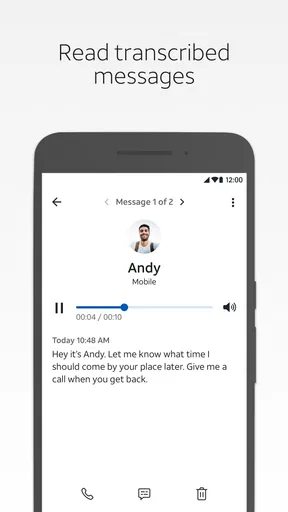
- Transcribes voicemails into readable text for quick scanning.
- Lets you call back, reply, or delete messages directly from the app.
- Displays caller details and message timestamps in an organized inbox.
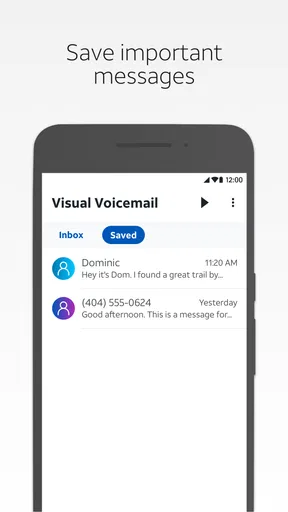
- Supports saving important voicemails for later reference.
- Reduces the need to dial voicemail and navigate spoken menus.
Limitations of AT&T Visual Voicemail
- Requires an eligible AT&T wireless plan and compatible device.
- Visual voicemail availability can vary by location and network coverage.
- Transcription accuracy may suffer with accents, noise, or unclear speech.
- Some features may stop working after switching carriers or plans.
- Voicemail storage limits can prevent new messages from being received.
Other Releases by AT&T Services, Inc.
View All
AT&T
Productivity4.5

AT&T ActiveArmor®
Tools4.2

AT&T Secure Family® parent app
Lifestyle4.5

Smart Home Manager
Productivity4.4
Similar Picks in This Category
View All
Google Messages
Google LLC4.6

Gmail
Google LLC4.1

Google Meet
Google LLC4.4

Google Chrome
Google LLC4.1

WhatsApp Messenger
WhatsApp LLC4.6

Carrier Services
Google LLC4.2
Frequently Asked Questions
What is AT&T Visual Voicemail and how does it work?
AT&T Visual Voicemail lets you manage voicemail messages from a visual inbox instead of calling a voicemail number and listening to messages in sequence. You can view caller information, read message details, play, pause, rewind, delete, or save messages, and sometimes return calls directly from the app. Availability and features may vary by device, wireless plan, and AT&T network support.
Is AT&T Visual Voicemail free to download and use?
The AT&T Visual Voicemail app may be available to download without a separate app purchase, but voicemail service and related features depend on your AT&T wireless plan. Standard mobile data charges could apply when messages are loaded or audio is streamed over cellular data. Before installing, check your plan, device compatibility, and any voicemail charges listed in your AT&T account.
Which phones and AT&T plans support Visual Voicemail?
Support depends on your phone model, operating system, AT&T account, and wireless plan. Many compatible Android phones include Visual Voicemail through an AT&T app or built-in feature, while some devices use the phone’s native voicemail interface. Older phones, prepaid accounts, unlocked devices, or phones using another carrier may have limited support, so compatibility should be confirmed before downloading.
Why is AT&T Visual Voicemail not showing new messages or notifications?
Missing messages or notifications can result from weak network coverage, disabled notifications, restricted background data, an outdated app, incorrect voicemail setup, or a temporary AT&T service issue. Restarting the phone, checking notification permissions, updating the app, and confirming mobile data access may help. If problems continue, call voicemail directly to verify that messages are being received.
Can I use AT&T Visual Voicemail while traveling or without mobile data?
You can usually access previously downloaded voicemail messages without an active data connection, but new messages and inbox updates may require cellular data or Wi-Fi. International use may involve roaming charges, depending on your plan. If traveling, review AT&T’s roaming terms and consider downloading important messages beforehand. Voicemail access can also vary when using Wi-Fi calling or an unsupported network.
